Review Mode on Web Device: What You See Is What You Review


Local Web Device overlay after arc#4525 · this article at ?review=1 · 1440×900 · 2026-08-21. The island is the whole chrome until you select text or open Page note. The status strip stays hidden while it is empty.
Start with an afternoon you already know
You are polishing a product landing page. Lint, validate, check, and build are green. The PR is fine. You open the locally rendered page and still wince: the hero feels empty under the real header, one block looks wrong once navigation is in place, a Chinese sentence is suddenly too long.
The defect is not "the file failed a gate." It is the screen a reader will get. Your fix ideas arrive on the spot: "make this longer," "delete this line," "swap in a concrete example."
Those notes used to land in PR comments, Slack, or a personal scratch pad. An agent never saw the selection. It could not attach "change this span" to the real page you were looking at.
In-page review mode is that loop, closed: on a what-you-see-is-what-you-get page, leave review suggestions on the spot; they become executable instructions next to the content item so you and an agent can fix them together. You stop reviewing source while the agent only sees files, and both sides miss the render.
It is not a public visitor comment box, and not another standalone CMS discussion product. It appears when you append ?review=1 on a local or development URL. Writing-time only.
The overlay chrome changed in 2026-08. The first public version used a bottom-left Page note button and an always-on status bar. That was honest, and it looked like a debug HUD sitting on the page. The current island keeps the same contract and gets out of the way.
Operations contract: In-page review mode. The rest of this piece walks the scene with real screenshots.
Why the review has to be on the rendered page
Automated gates for a Web Device site are good at structure: bad DSL, wrong source bindings, broken links, failed pre-render.
They cannot replace this class of judgment:
- a sentence that looks fine in source but feels empty under the real header and layout;
- a shared skeleton that only looks wrong when three landing pages sit side by side;
- a line that passes every check but is clearly too long only on the finished
/zh/render.
The object under review is the browser page. In-page review writes "what I saw" and "what it should become" in one place, and leaves an agent a path it can execute.
What you see when it is on
Run the blocklet locally (arc blocklet run or an existing arc service). On any rendered page URL, append:
?review=1The value must be exactly 1. true or yes will not enable the overlay.
A frosted-glass island appears at the bottom right. Three icons, no second corner:
| Icon | Control | Purpose |
|---|---|---|
| Pointer | Point | Opt-in. Click an AUP node, or drag a box, without stealing ordinary clicks while it is off |
| Bubble | Page note | Whole-page feedback with no text selection |
| Pause | Freeze | Pause CSS animations, transitions, and videos so you can mark a moment |
There is no bottom-left Page note button any more. The status strip (Review: open · N planned / N done, locale ticks, Approve page) is still in the overlay; it stays hidden while empty, and it fills after a signed-in session loads .review/.actions/state. Anonymous ?review=1 still lets you point, select, and compose.
Pointing is off until you arm it. That is deliberate: you have to be able to click a real link on the page you are reviewing.
Scenario 1: feedback on a specific span (anchored)
- Select a stretch of body text on the page (the string the reader sees). You do not have to arm Point for this.
- A light composer appears near the selection: selected text preview, type pills, instruction field, Add / Cancel.
- Pick a type, write what should happen, submit.
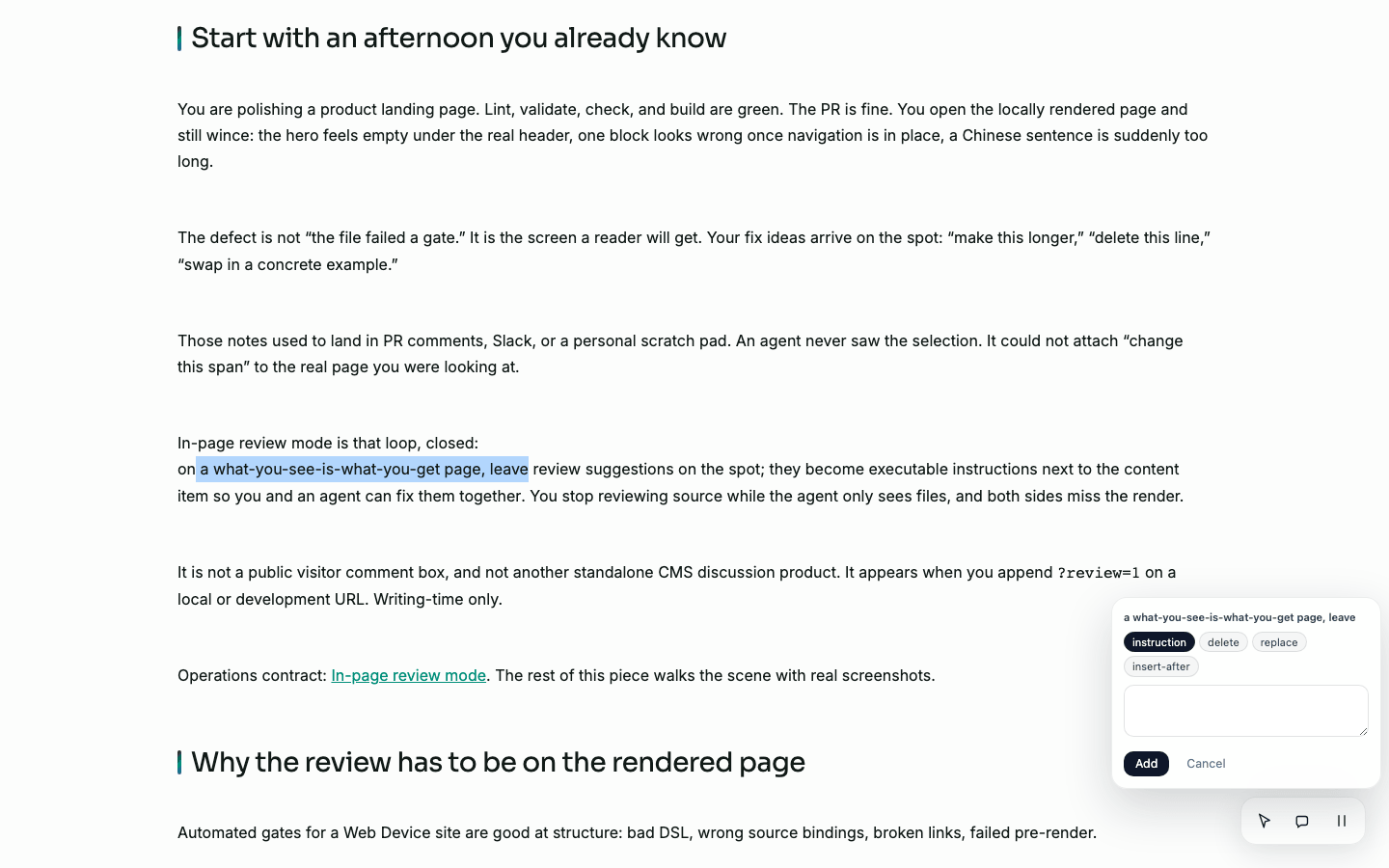
Same capture. After selecting "what-you-see-is-what-you-get page, leave", the composer carries that preview. Types are actions, not chat labels.
| Type | Meaning | Typical body |
|---|---|---|
instruction | Free-form instruction | "Make this concrete; add one real command example." |
delete | Remove the selection | (body optional) |
replace | Replace selection with the body | The replacement text |
insert-after | Insert after the selection | Text to insert |
For anchored types the runtime also stores about fifty characters of context before and after the selection, marked with {selected}. When the prose later changes, that context is what lets a follow-up pass re-find the span instead of trusting the first indexOf match on the page.
Point is a second verb, not a replacement for selection. Arm the pointer, then click an element that carries data-aup-id (an AUP-rendered node). Shift/meta-click adds another node; dragging a box can cover several, or an empty region. On this article's markdown body the 2026-08-21 capture found zero data-aup-id nodes, so Point had nothing to hover. Text selection still worked. Do not treat Point as "click anywhere on any page."
Scenario 2: one note for the whole page
Some feedback does not attach to a sentence: "this page is too long," "it shares a skeleton with the previous landing." Click the bubble in the island and submit without a selection.
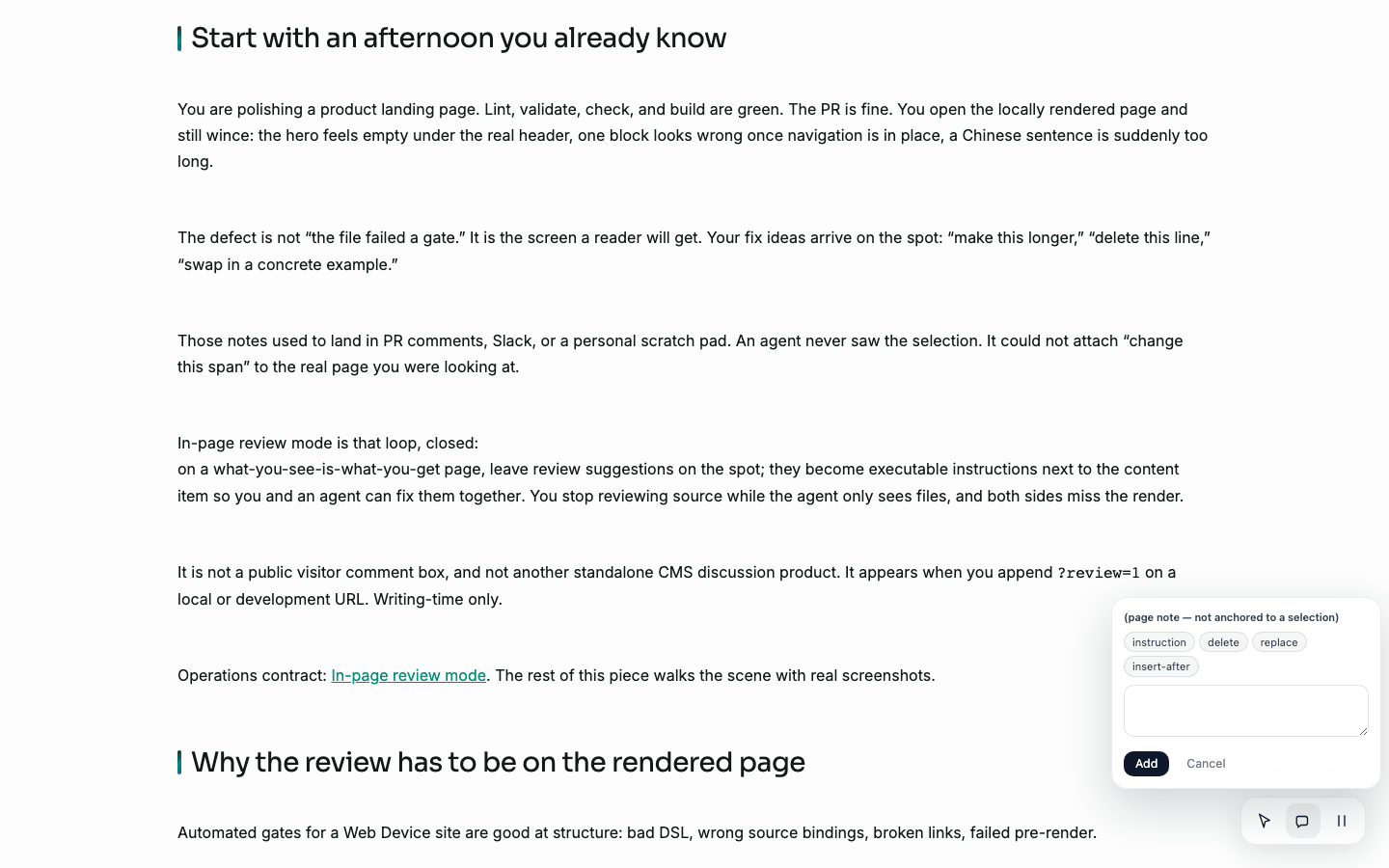
Page note is not tied to a selection. Use it for overall pacing, structure, or cross-page comparison.
Freeze when the state only lasts a moment
CSS animation and video are awkward to review: the frame you care about is gone before you finish a sentence. Freeze pauses animations, transitions, and <video> elements. The island itself stays live, so you can still open a composer.

Freeze is a review aid, not design mode. It does not edit CSS. Turn it off with the same icon (label becomes Unfreeze).
The note has to sit next to the content
The overlay is only half the loop. A screenshot in Slack, a pasted selector, a comment on a PR, all still leave the agent looking at files while you were looking at a page.
Web Device writes the note as a file next to the content item, on the same AFS tree the agent already uses. You leave instruction / delete / replace / insert-after / page-note where the site source lives. The identity of a span is the string the reader saw, plus about fifty characters of {selected} context, not a CSS selector you hope still matches after the next layout change.
The first overlay was correct and noisy. The glass island is the same contract, quieter: Point is opt-in, the composer parks on the target, Freeze holds a frame, an empty status strip stays hidden. That is a chrome change, not a new product.
After submit: two levels of status
Once a signed-in session can read .review/.actions/state, the status strip shows open items and a short summary. From there you can:
- mark a row Done (or Reopen);
- Approve page when the whole page is signed off (or Reopen page);
- Run checks to show page-scoped lint / SEO findings next to human notes.
Keep the two levels separate:
| Level | Meaning | Values |
|---|---|---|
| Page | Is this page approved as a unit? | open / approved |
| Item | Is this one note processed? | open / done |
A new submission demotes an approved page back to open. A signed-off page must not stay approved in silence after more feedback arrives.
This 2026-08-21 capture was anonymous. The island and composers above are live; the filled status strip is not in these screenshots, because the overlay hides an empty bar and does not load item rows until session context is present. That is a chrome fact, not a missing product.
Where notes live (and why agents can use them)
Feedback is not a site-wide comment store and not a custom HTTP API. It sits next to the content item:
content/docs/web-device/overview/
  content.md
  content.zh.md
  .review/
    a1b2c3d4.md      # one feedback item
    .status.md       # page-level open / approved
A single item looks roughly like:
---
status: open
type: page-note
locale: en
author: anonymous
created: 2026-08-21T…
---
Hero feels thin under the real header: add one concrete example.
Anchored items also carry anchor and context. Pointed items may also carry aupId, bbox, or nearby text. locale records which language URL you were on when you submitted (important on multi-locale sites).
List or snapshot via AFS (replace the site name):
arc afs ls /web/content-sites/<site>/collections/docs/web-device/overview/.review
arc afs exec /web/content-sites/<site>/collections/docs/web-device/overview/.review/.actions/state
A typical agent loop: read .review/ → apply changes by type → mark items done → a human approves the page.
Publish does not ship .review/. Review data stays in the authoring tree; deploy snapshots exclude directories named .review. Public visitors do not get a writable review surface just because a query flag appears on a public host.
Suggested workflow (see it → note it on the spot → fix it together)
- Get structure green first:
arc dsl lint/validate/blocklet check, build if needed. Do not open review for parse failures. - Open the page a reader will get (local render) and append
?review=1. That is the WYSIWYG review surface. - Mark issues on the spot: write while looking at the finished page, not while guessing from source. Anchored notes for sentences; Page note for whole-page issues; Point only when the node actually has
data-aup-id. - Hand the list to an agent (or yourself): the agent reads
.review/, applies changes bytype, marks Done; you can edit by hand and mark Done the same way. - On multi-locale sites, use the Locales line (once the status strip is loaded) and open each finished locale URL with the same flag.
- Approve page when the render is good enough; publish on your normal path.
.review/does not ship to visitors.
When not to use it
| Situation | Better tool |
|---|---|
| AUP parse errors, missing components, empty sources | Fix lint / validate / check first; see Diagnose a site |
| Public end-user discussion or ratings | Product comment features, not ?review=1 |
| Many concurrent editors who need auto-merged opinions | This mode keeps conflicting notes side by side on purpose |
| Implementation debate on a PR | GitHub review is fine; this mode covers rendered copy and layout judgment |
Keep reading
- In-page review mode: enable flag, types, on-disk fields, AFS actions, failure boundaries
- Preview, build, and publish: keep local run, build, and formal publish separate
- Web Device: Declare a Website, Then Pick the Right Path: what Web Device is