In-page review mode lets you leave feedback on the rendered page, not on the source tree. Feedback lands next to the content item as .review/ files, so agents and people can process it without a separate comment system.
This page is an operations guide. Overlay chrome below was verified on 2026-08-21 against the glass-island HUD that landed in arc#4525. The feature itself landed in 2.0.0-beta.19 / 2.0.0-beta.20 via arc#2870. It is not a design essay; for motivation see the feature article.
When to use it
Use review mode when:
- lint, validate, check, and build are green, but the rendered copy still needs human judgment;
- you want feedback tied to the exact string a reader sees, including multi-locale renders;
- an agent should later apply mechanical edits (
delete/replace/insert-after) or free-form instructions.
Do not use it as:
- a public visitor feedback widget on production;
- a multi-user conflict resolver (opposite opinions stay side by side);
- a substitute for
arc dsl lint/validate/blocklet check(those still own structural defects).
Enable review mode
- Run the blocklet the usual way (see Preview, build, and publish):
- Open the printed URL for the page you care about, then append exactly
?review=1:Only the value1enables the overlay.?review=true,?review=0, or a bare?reviewdo not. - Confirm the page injects the review UI. A frosted-glass island sits at the bottom right with three icons:Selecting body text opens a light composer near the selection (Add / Cancel). The status strip (
Review: open · N planned / N done, Approve page, Run checks) stays hidden while empty. It fills after a signed-in session loads.review/.actions/state. Anonymous?review=1still shows the island and composers.

Glass-island HUD · this site's in-page-review article at ?review=1 · 1440×900 · 2026-08-21. Capture used a local Web Device handler after arc#4525, not a published CLI tag.
Review mode works on draft and already-published pages. Injection is per request and opt-in; static HTML in a publish snapshot does not auto-enable it.
Leave feedback
| Action | How |
|---|---|
| Anchored note | Select text on the page (Point does not need to be on). Choose a type, optionally write an instruction, click Add. |
| Pointed note | Arm Point, then click a node with data-aup-id. Shift/meta-click adds another node; dragging a box can cover several nodes or an empty region. |
| Whole-page note | Click the bubble (Page note) in the island. No selection is stored. |
| Freeze a frame | Click Freeze. Click again to unfreeze. Does not edit CSS. |
| Dismiss panel | Cancel, or press Escape. Clearing the text selection also closes a selection-driven panel. |
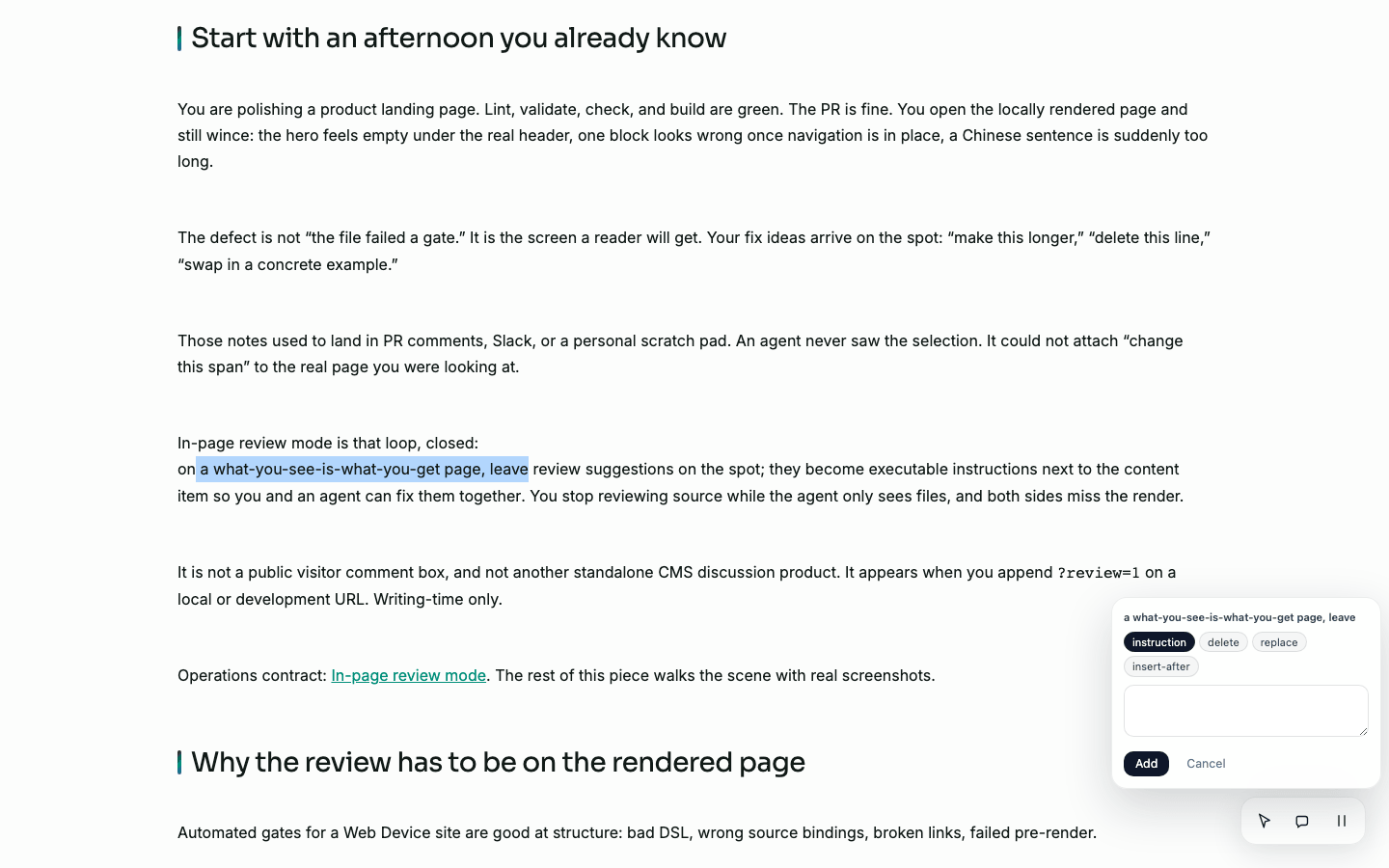
Text selection on a markdown article body. Point was off. Types are instruction / delete / replace / insert-after.
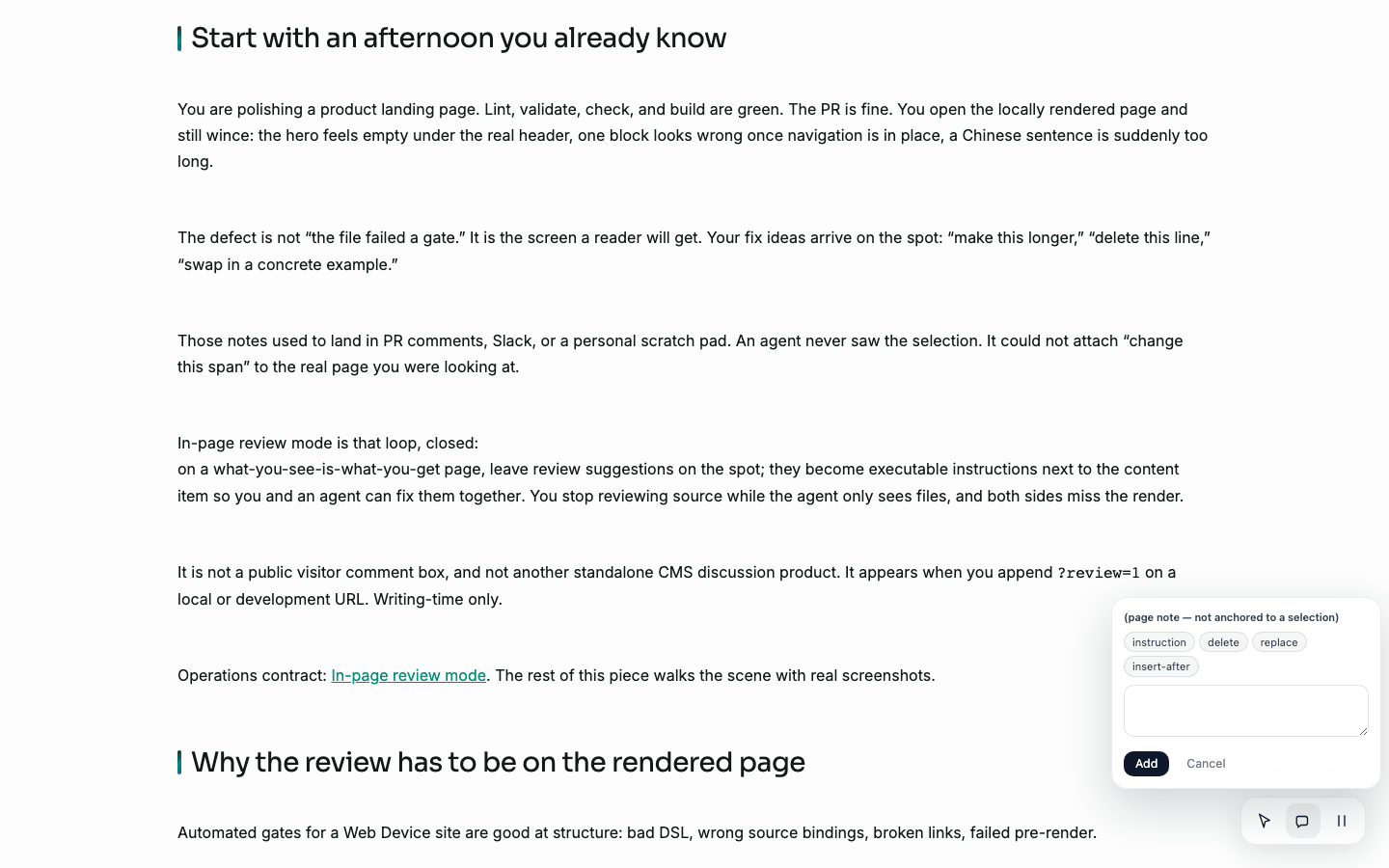
Page note from the island bubble. Composer parks above the island.
Point only targets elements that carry data-aup-id (AUP-rendered nodes). A 2026-08-21 capture of this site's markdown article body found zero such nodes; text selection still worked. Do not document Point as "click anywhere."
Feedback types
type | Anchored? | Meaning |
|---|---|---|
instruction | yes | Free-form instruction about the selection ("make this longer") |
delete | yes | Remove the selected content |
replace | yes | Replace the selection (body carries the replacement text) |
insert-after | yes | Insert content after the selection |
page-note | no | Page-level note with no text anchor |
These are executable instructions, not a discussion thread. Conflicting notes on the same span are all kept; nothing is auto-merged.
What is captured
For anchored types the overlay records:
anchor: the selected string as the reader sees it;context: about 50 characters before and after, with{selected}marking the span (DOM Range offsets, not the firstindexOfmatch);locale: the locale segment of the URL at submit time (server-injected; empty means "not tagged");instruction: free text for every type exceptdelete.
Script, style, noscript, and the review UI itself are excluded from context capture.
Two-level status
| Level | File | Values | Unit of |
|---|---|---|---|
| Page | .review/.status.md | open · approved | Approval of the whole page |
| Item | .review/<id>.md field status | open · done | Processing of one note |
The status strip stays hidden while empty. After a signed-in session loads .review/.actions/state:
- Approve page / Reopen page toggles page-level status;
- Done / Reopen on a row toggles that item.
Anonymous overlay sessions still compose notes; they do not paint item rows until session context is present.
Submitting a new item demotes an approved page back to open. Page approval and item processing are independent: a page can be approved while some items remain open only if you re-approve after new work, or if you never demote (new submits always re-open).
Where feedback is stored
Feedback follows the content item, not a site-wide comment store.
content/articles/<slug>/
  content.md
  content.zh.md
  .review/
    <id>.md          # one feedback item
    .status.md       # page-level status (optional until set)
Pages under pages/<slug>/ use the same relative structure next to layout.aup.
Example item file shape:
---
status: open
type: instruction
anchor: selected text on the page
context: …before…{selected}…after…
locale: en
author: anonymous
created: 2026-08-02T03:33:00.000Z
---
make this longer
Page status file:
---
status: approved
updated: 2026-08-02T04:00:00.000Z
---
Ids are server-generated (8 hex characters). Clients cannot choose an id to overwrite an existing item.
Read and drive status through AFS
Virtual paths live under the web-device mount (default /web):
/web/content-sites/<site>/collections/<collection>/<slug>/.review
/web/content-sites/<site>/pages/<slug>/.review
Actions (same item path + /.review/.actions/<action>):
| Action | Purpose | Typical args |
|---|---|---|
submit | Create one item | type, optional anchor / context / instruction / locale / author |
set-item-status | Mark item open or done | id, status |
set-page-status | Mark page open or approved | status |
state | Read page status + all items + locale presence | (none) |
List and read:
# List structured items for one content record (path is site-specific)
arc afs ls /web/content-sites/<site>/collections/articles/<slug>/.review

# Read one item
arc afs read /web/content-sites/<site>/collections/articles/<slug>/.review/<id>

# Snapshot used by the overlay status bar
arc afs exec /web/content-sites/<site>/collections/articles/<slug>/.review/.actions/state
Replace <site> and the collection path with the content site you actually mounted. Paths that do not resolve to a real content item return NOT_FOUND rather than creating a stray .review/ directory.
Locale and automated checks
Multi-locale items share one .review/ directory (variants are sibling files such as content.md / content.zh.md). The status bar can show which declared locales have a file present (✓ / ✗). That is "other renders worth opening", not a separate review state per locale.
Each submission can carry the locale of the page you were looking at. Use that field when the same string appears in more than one language version.
Run checks on the status bar runs site-level lint and check-seo for this page only through the declared-site actions namespace, and shows findings next to human feedback. A failed check surfaces as an error row; an empty result means no findings for this page, not "checks never ran".
Publish does not ship .review/
Publish snapshots exclude any directory named .review from both the physical copy and the published tree metadata (arc#2870 Phase 3). Review data stays with the authoring tree; it must not appear in public deploy artifacts.
That is separate from the ?review=1 query flag. Even if someone appends the flag on a public host, there is no .review/ payload in the published snapshot for them to write into unless the host still exposes a writable content-space surface (local/dev only by design of this workflow).
Limits and failure modes
| Boundary | Behavior |
|---|---|
| Enable flag | Only ?review=1 injects the overlay |
| Point target | Only elements with data-aup-id. Markdown body text still uses text selection |
| Empty status strip | Hidden (:empty { display: none }) until state loads |
| Freeze | Pauses CSS animation, transition, and video; HUD itself is excluded |
| Free-text size | anchor / context / instruction capped at 64 KiB each; oversize → VALIDATION |
| Invalid type or status | VALIDATION; values are never coerced |
| Missing content item | NOT_FOUND; no write under a guessed path |
| Read-only AFS | READONLY |
Invalid locale string | Dropped (submission still succeeds without locale) |
| Concurrent submits | Distinct server ids; no multi-user merge |
| Broken / stale anchor after rewrite | Item is kept; use context for fuzzy re-location; do not auto-delete |
| Domain-router vs portal URL | Overlay derives the content-site path from the server; wrong site name fails the action loudly |
Related pages
- Preview, build, and publish: local run vs build vs formal publish
- Run, check, and inspect: first local verification chain
- Diagnose a site: narrow structural failures before review
- Content objects, metadata, and locales: where content items live on disk
- Feature article: Review the rendered page, keep feedback with the content
- Bookmark and note (save capability): reader save chrome, not this overlay