ComponentInstaller は、他の Blocklet に依存する機能のゲートキーパーとして機能するユーティリティコンポーネントです。指定されたコンポーネントの依存関係がインストールされているかどうかを検証します。インストールされていない場合、管理者(デフォルトでは owner または admin ロール)が直接インストールするためのユーザーフレンドリーなインターフェースを提供します。ユーザーが必要な権限を持っていない場合は、管理者に連絡するよう促すメッセージを表示します。
このコンポーネントは、不足しているオプションの依存関係を適切に処理できる堅牢なアプリケーションを作成するために不可欠であり、管理者をインストールプロセスを通じてガイドすることでユーザーエクスペリエンスを向上させます。
仕組み
このコンポーネントのロジックは、子コンポーネントをレンダリングする前に依存関係が満たされていることを確認するため、明確で順次的なプロセスに従います。
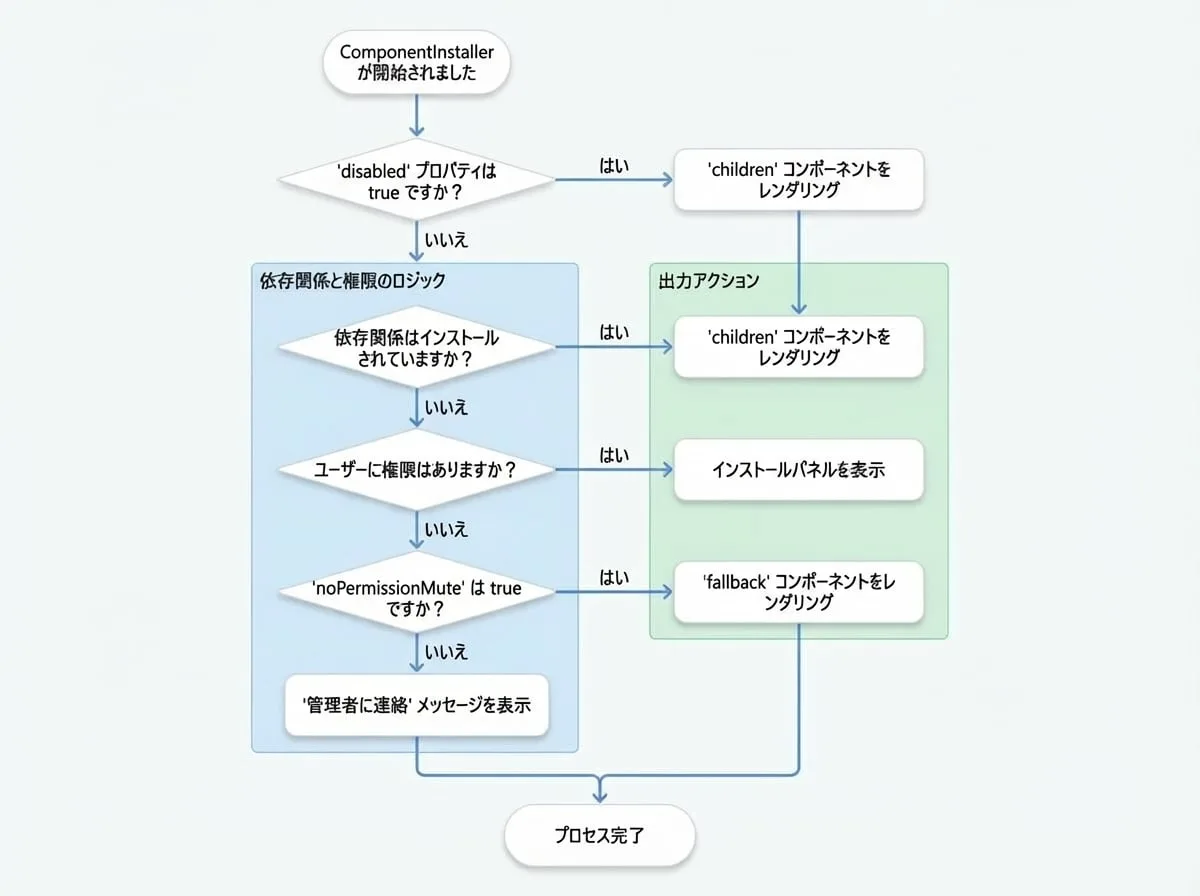
- 依存関係のチェック:
didプロパティを読み取り、Blocklet のメタデータ(window.blocklet.optionalComponents)と照合して、必要なコンポーネントがインストールされているかどうかを判断します。 - 権限チェック: 不足しているコンポーネントがある場合、
SessionPermissionコンポーネントを使用して、現在のユーザーのロールがrolesプロパティで指定されたものと一致するかどうかを検証します。 - 条件付きレンダリング:
- すべての依存関係がインストールされている場合、その
childrenをレンダリングします。 - 依存関係が不足しており、ユーザーに権限がある場合、ポップアップのインストールパネルを表示します。
- 依存関係が不足しており、ユーザーに権限がない場合、管理者に連絡するよう提案を表示するか、
noPermissionMuteが有効な場合はfallbackコンポーネントをレンダリングします。
基本的な使い方
オプションの Blocklet に依存するコンポーネントや機能を ComponentInstaller でラップします。必要なコンポーネントの DID を提供してください。
"MyFeature.jsx"
import ComponentInstaller from '@arcblock/blocklet-ui-react/lib/ComponentInstaller';
import MyDependentComponent from './MyDependentComponent';

export default function MyFeature() {
  // 必要なコンポーネントの実際の DID に置き換えてください
  const requiredComponentDid = 'z8ia2427634f1e909a304e2b963715a18';

  return (
    <ComponentInstaller did={requiredComponentDid}>
      {/* このコンポーネントは依存関係が満たされている場合にのみレンダリングされます */}
      <MyDependentComponent />
    </ComponentInstaller>
  );
}
Props
ComponentInstaller は、その動作をカスタマイズするために以下の props を受け入れます。
- did
string | string[](required) — チェックするコンポーネントの依存関係の DID(または DID の配列)。これは、必要な Blocklet の主要な識別子です。 - children
any(required) — すべての依存関係がインストールされていることを確認した後にレンダリングするコンテンツ。標準の React ノードまたはレンダー関数を指定できます。 - roles
string[](default:["owner", "admin"]) — インストール UI を表示し、不足しているコンポーネントをインストールすることが許可されているユーザーロールの配列。 - fallback
React.ReactNode— 依存関係をチェックしている間、またはインストール権限のないユーザーに対して noPermissionMute が有効な場合に表示するフォールバックコンポーネント。 - noPermissionMute
boolean(default:false) — true の場合、権限のないユーザーには「管理者に連絡」メッセージの代わりに fallback コンポーネント(または何も表示しない)が表示されます。 - disabled
boolean(default:false) — true の場合、コンポーネントはすべてのチェックをバイパスし、即座にその children をレンダリングします。 - onInstalled
function— 依存関係のチェックが完了した後にトリガーされるコールバック関数。インストール済みのコンポーネントのリストを受け取ります。 - onError
function— 依存関係のチェック中にエラーが発生した場合にトリガーされるコールバック関数。エラーの原因となったコンポーネントのリストを受け取ります。 - onClose
function— インストールのポップアップが閉じられたときに呼び出されるコールバック関数。 - closeByOutSize
boolean(default:false) — true の場合、ユーザーがポップアップの外側をクリックすると、インストールのポップアップが閉じます。 - warnIcon
React.ReactNode— インストールのポップアップのデフォルトの警告アイコンを置き換えるためのカスタム React ノード。
高度な使い方
複数のコンポーネントのチェック
did プロパティに DID の配列を渡すことで、複数の依存関係を一度にチェックできます。指定されたすべてのコンポーネントがインストールされている場合にのみ、子はレンダリングされます。
"MyDashboard.jsx"
import ComponentInstaller from '@arcblock/blocklet-ui-react/lib/ComponentInstaller';
import AnalyticsWidget from './AnalyticsWidget';
import CmsWidget from './CmsWidget';

export default function MyDashboard() {
  const requiredDids = [
    'z8ia2427634f1e909a304e2b963715a18', // 分析サービス
    'z8ia3c1f2e4b8e6a1b2c3d4e5f6a7b8c9', // CMS サービス
  ];

  return (
    <ComponentInstaller did={requiredDids}>
      <AnalyticsWidget />
      <CmsWidget />
    </ComponentInstaller>
  );
}
ローディング状態のためのフォールバックの使用
依存関係のチェックが進行中の間、fallback コンポーネントを提供してユーザーエクスペリエンスを向上させます。これは、noPermissionMute と共に使用して、権限のないユーザーにプレースホルダーを表示する場合にも役立ちます。
"FeatureWithLoading.jsx"
import ComponentInstaller from '@arcblock/blocklet-ui-react/lib/ComponentInstaller';
import CircularProgress from '@mui/material/CircularProgress';
import Box from '@mui/material/Box';
import MyDependentComponent from './MyDependentComponent';

export default function FeatureWithLoading() {
  const LoadingSpinner = (
    <Box sx={{ display: 'flex', justifyContent: 'center', p: 4 }}>
      <CircularProgress />
    </Box>
  );

  return (
    <ComponentInstaller
      did="z8ia2427634f1e909a304e2b963715a18"
      fallback={LoadingSpinner}
      noPermissionMute={true}
    >
      <MyDependentComponent />
    </ComponentInstaller>
  );
}
レンダープロップによるカスタム UI
UI を完全に制御するために、children として関数を渡すことができます。この関数は hasPermission、optComponents、および installStatus を含むオブジェクトを受け取り、完全にカスタムのインストールインターフェースを構築することができます。
"CustomInstallerButton.jsx"
import ComponentInstaller from '@arcblock/blocklet-ui-react/lib/ComponentInstaller';
import Button from '@mui/material/Button';

export default function CustomInstallerButton() {
  const requiredDid = 'z8ia2427634f1e909a304e2b963715a18';

  return (
    <ComponentInstaller did={requiredDid}>
      {({ hasPermission, optComponents, installStatus }) => {
        const isMissing = optComponents.length > 0;
        const status = installStatus[requiredDid] || 'not_installed';

        if (!isMissing) {
          return <p>Feature is ready to use!</p>;
        }

        if (!hasPermission) {
          return <p>Please ask an admin to install the required component.</p>;
        }

        return (
          <Button
            variant="contained"
            disabled={status !== 'not_installed'}
            onClick={() => window.open(optComponents[0].installUrl, '_blank')}
          >
            {status === 'not_installed' ? `Install ${optComponents[0].meta.title}` : `Installing... (${status})`}
          </Button>
        );
      }}
    </ComponentInstaller>
  );
}
まとめ
ComponentInstaller は、Blocklet アプリケーション内でオプションの依存関係を管理するための強力なコンポーネントです。必要なコンポーネントが利用可能であることを保証するための構造化されたユーザーフレンドリーな方法を提供し、必要に応じて管理者をインストールプロセスを通じてガイドします。このコンポーネントを使用することで、ユーザーの環境に適応する、より回復力があり機能豊富なアプリケーションを構築できます。
コンポーネントの管理に関する詳細については、リソースとコンポーネント管理のためのより包括的なインターフェースを提供する BlockletStudio コンポーネントにも興味があるかもしれません。